Table of Content
- What Is the Baji Live App and Who Is It For
- Baji Live App Download Options for Android, iOS and APK
- How to Install Baji Live App Step by Step
- Login, Registration and First Access in the Baji Live App
- Main Features of the Baji Live App
- Payments, Deposits and Withdrawals in the App
- Bonuses, Promotions and App-Related Offers
- Is Baji Live App Safe to Use
- Common Problems with Baji Live App Download, Install or Login
- FAQ About Baji Live App Access and Usage
"Over years of analysing iGaming in Bangladesh our editorial team has recorded enormous demand for mobile solutions among the audience. The key takeaway: a convenient interface often masks serious legal and technical risks, so it is critically important to separate official facts from marketing claims." - Nadia Farzana Haque, Editor-in-Chief, iGaming Bangladesh
What you need to know before scrolling further:
- Where to download:APK from the official provider site (not Google Play); iOS users add a PWA shortcut via Safari.
- APK size:approximately 6.6 MB; requires Android 4.1+, 1 GB RAM, 50 MB free space.
- Local payments:bKash and Nagad are supported; minimum deposit typically starts at 500 BDT.
- Legal reality:online betting in Bangladesh is restricted under the Public Gambling Act 1867 and newer digital-era regulations. Always verify your local legal status before use.
What Is the Baji Live App and Who Is It For
Baji Live app is a mobile product built for an audience in Bangladesh. It combines sports betting and live casino functions in a single interface. The application's core purpose? Giving users fast, persistent access to the platform without opening a browser every time they want to check a match or place a wager.
"Participants described smartphone apps as tools that make betting immediate and continuous, from any place, at any time." - Grounded Theory Study of Smartphone Sports Betting, Australia (2024).
That immediacy removes spatial and temporal barriers. But it also demands greater awareness of device security and responsible gambling practices. The target audience includes cricket fans and sports enthusiasts looking for an official access point in a mobile format. Compared to the standard website, the baji app stores data locally on the device, which can speed up live-line loading. The trade-off: you need to keep your software updated and your device protected.
Context: Consumers frequently search for verified data on the legal status of platforms while being bombarded by aggressive advertising. As part of an educational initiative by iGaming Bangladesh, available sources were analysed. The finding was clear: user safety is only achievable through strict compliance with local norms and reliance on verified information.
Baji Live App for Sports Betting, Cricket and Casino
The application is developed with a strong focus on sports betting, particularly major cricket events. Integrated options also include live casino tables and virtual casino games.
"Gamified online environments significantly increase anxiety and depression among young adults, especially when financial motivation is involved." - Study of Gamified Problem Gambling and Psychological Distress, Ghana (2023).
The combination of sports predictions with vivid casino interfaces amplifies psychological engagement. That is a well-documented characteristic of the play-and-bet format within such mobile shells. Users should remain aware of these dynamics, especially during extended sessions inside the app. A quick break every 30 minutes is not just advice; it is a genuine protective habit.
App, Mobile Site or Browser Version: What Changes for Users
The difference between access formats comes down to three things: initialisation speed, device memory requirements and interface convenience. A downloadable application (the baji live app) saves cache and session settings. The browser version requires periodic re-authentication. And the mobile site serves as a universal option with no file installation needed.
| Parameter (Access mode) | Baji Live App (Android/iOS) | Mobile Web / PWA | Desktop Browser Version |
|---|---|---|---|
| Installation | Requires downloading a file (APK) or a configuration profile | No installation required, access through browser URL | No installation required |
| Speed & Interface | High responsiveness, optimised for touch screens | Depends on internet speed, adaptive design | High performance, wide screen |
| Login convenience | Persistent session, potential biometric support | Session often expires, repeated credential entry | Standard web authorisation |
| Updates | Requires manual APK update downloads | Server-side updates (automatic) | Always the latest version on page load |
"Well-implemented PWAs improve load speed and provide partial offline functionality through caching, without requiring an app-store installation." - PWA Implementation Case Study, Omah Wayang Klaten (2023).
Pros of the app: biometric login, lower data consumption after initial install, works under weak internet conditions. Cons of the app: occupies device storage (from 50 MB), requires manual APK updates, not available through official app stores.
In short, the app offers maximum mobility and speed. The mobile site frees you from file installation. The browser version is best for studying detailed match statistics on a large screen. Pick the format that matches your daily routine and device capacity.
Baji Live App Download Options for Android, iOS and APK
Download options depend on the operating system and restrictions of local distribution platforms. As of 2026, publicly available sources confirm no official product in Google Play Market or the Apple App Store for this brand. That is consistent with the broader pattern of sideloaded iGaming apps in the region. Baji live app download for iOS and installation on Android are typically accomplished through alternative channels such as the direct APK route. Users should always look for the latest version of the application file exclusively on the official provider's pages to ensure compatibility with their devices and system.
Baji Live App Download for Android APK
For devices running Google's operating system, downloading an installation file in APK format is required. Before downloading, make sure your device meets the minimum requirements:
| Requirement | Specification |
|---|---|
| OS | Android 4.1 and higher |
| RAM | 1 GB minimum |
| Free Storage | 50 MB |
| APK File Size | Approximately 6.6 MB |
The baji apk is optimised for smartphone brands popular in Bangladesh: Symphony, Walton, Xiaomi, Samsung, Vivo, Realme, as well as international devices from Infinix, Tecno and Motorola. This Android installation path suits the majority of supported devices. However, it requires version control since automatic updating through official stores is unavailable. Worth noting: many users in Dhaka and Chittagong report smooth performance even on budget Walton devices, provided the OS version is current.
"Applications distributed as unaudited APKs bypass app-store security reviews and may contain vulnerabilities for data interception." - Secure Cloud-Based Mobile Apps: Attack Taxonomy and Security Requirements (2023).
Disclaimer: The information provided here is general in nature and does not replace professional advice. Downloading APK files from unofficial sources carries both technical and legal risks. Always verify the source URL, check the digital signature of the package, and ensure your device has active security scanning.
How to verify you are on the official site before downloading:
- Check the URL: look for the exact domain displayed in the browser address bar. Fraudulent clones often use slight misspellings.
- Look for HTTPS and a valid certificate: tap the padlock icon in your browser to confirm the certificate belongs to the expected entity.
- Compare the APK hash: if the provider publishes a SHA-256 checksum, compare it to the downloaded file before installing.
- Avoid Telegram and social-media links: never download baji live download files from unverified channels. The official site is the only trustworthy source.
Baji Live App Download for iOS and Apple Devices
On Apple devices the most common format is a Progressive Web App (PWA) or a dedicated mobile layout, since strict App Store rules restrict direct downloads of such applications. This iOS access for Apple devices allows you to add the site icon to your home screen, mimicking a full application experience without a complex installation flow. No specific system requirements are necessary beyond a stable internet connection, as the PWA runs inside Safari and benefits from automatic server-side updates. The baji live app download ios process, in other words, is simpler than the Android path but offers slightly fewer native features like push notifications (Apple restricts those for PWAs in some iOS versions).
How to Install Baji Live App Step by Step
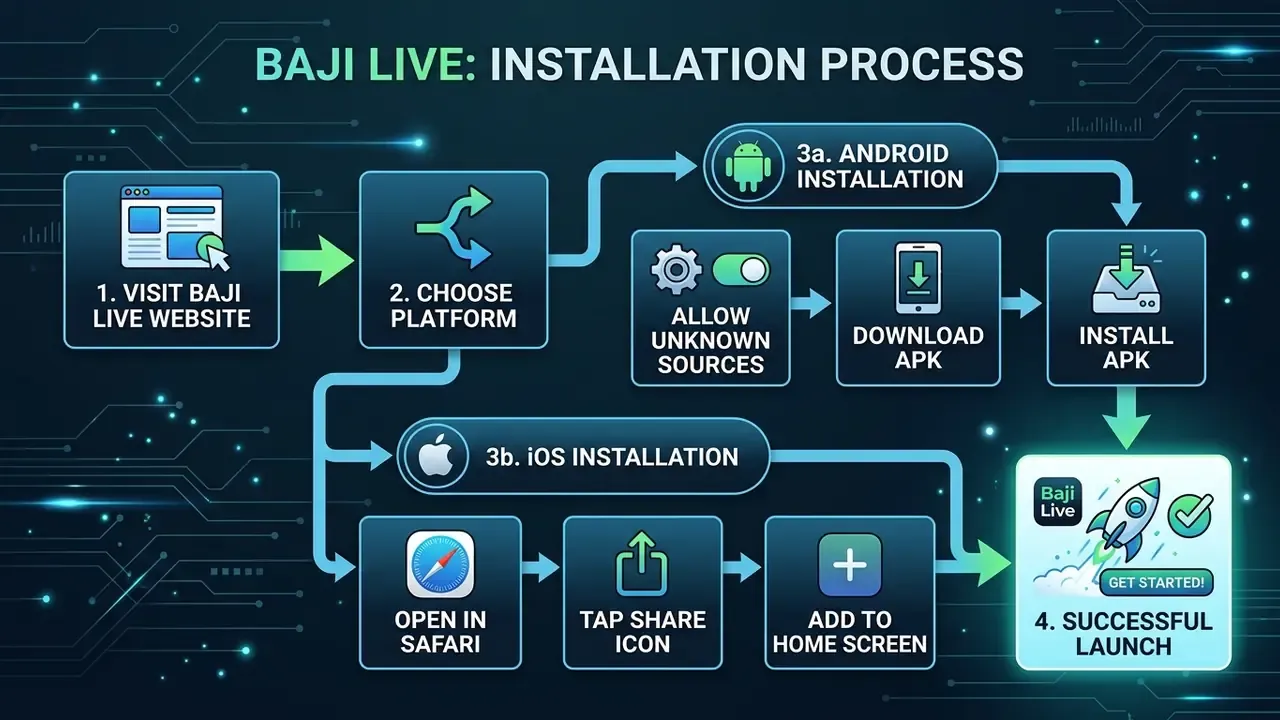
The installation process requires completing a sequence of steps, approving system prompts, and modifying device settings to allow third-party file installation. Every click-and-confirm step should be performed consciously. Pay attention to which installation permissions the application requests.
Installation on Android: From Download to Opening the App
- Start download - tap the download link on the official site.
- Wait for the file - let the APK save completely in your Downloads folder.
- Allow installation in settings - go to Settings > Privacy > Installation from Unknown Sources and enable permission for the browser you used (exact menu names vary by Android version and device brand).
- Confirm application installation - open the downloaded file and tap Install in the system pop-up.
- Open the app - the Baji Live icon will appear on your home screen; tap to launch.
One small detail people overlook: device architecture must match the file requirements. For example, an ABI mismatch (arm64-v8a vs. armeabi-v7a) can trigger a package-parsing error. If you see "There was a problem parsing the package," this is likely the cause.
Installation on iOS: How to Add and Open the App
- Open the official site in Safari on your Apple device.
- Tap the Share button (square with an upward arrow).
- Select "Add to Home Screen" from the sharing options.
- Name the shortcut and tap Add in the top-right corner.
- Launch - the PWA icon will appear alongside your other apps; tap for a first launch.
PWA technology is supported by the majority of current iOS devices. If you are running iOS 16.4 or later, you may also receive limited web push notification support, which is a relatively recent addition from Apple.
Login, Registration and First Access in the Baji Live App
To access match analytics and betting features, users must create an account (sign up) and complete first access. This account-setup stage includes filling in a registration form, confirming personal data, and subsequent login. The user-entry flow is standardised and relies on identity verification.
"The number of US states with legal sportsbooks grew from 1 in 2017 to 38 by 2024; 94% of wagers in 2023 were placed online." - JAMA Internal Medicine, Time Series Study on Sports Betting Legalization (2025).
This rapid digital expansion underlines the need for robust Responsible Gaming standards at every registration touchpoint, regardless of jurisdiction. Bangladesh is no exception.
How to Create an Account in the App
Registration steps for new users typically include entering a phone number and confirming via OTP. The account-creation flow requires entering truthful profile data before first use, since local financial operations in Bangladesh are tightly linked to verified mobile financial service (MFS) wallets. Standard required fields are: mobile number, password, currency selection (BDT), and optional email or referral code.
A practical tip: use the same phone number for your baji app account and your bKash or Nagad wallet. Mismatched numbers are one of the most common reasons deposit attempts fail later on.
How to Log In and Restore Access if Needed
The login sequence requires entering previously registered credentials. If access issues arise and you cannot re-open the application, contact official support. Never share confidential data (passwords, PINs) through unverified messengers. Most platforms offer a "Forgot Password" link that triggers an OTP to your registered mobile number, allowing you to reset credentials directly. The process usually takes under two minutes, though network congestion during peak hours (say, during a BPL match) can add a short delay.
Main Features of the Baji Live App
The mobile platform interface offers unified access to live betting, sports-event monitoring, and virtual games. The feature set includes optimised account management, a customised experience on the mobile platform, and push-style update alerts. The menu structure is designed to speed up access to live casino and casino games sections.
Sports Betting and Live Cricket Use Cases
The cricket-betting section is the centrepiece of the system. That makes sense for a Bangladesh-focused product, where cricket is, well, practically a national obsession. Users can find football and other sports options alongside local sporting events. The platform supports real-time wagering under dynamically changing odds, covering major leagues such as the BPL (Bangladesh Premier League), IPL, CPL, Big Bash League and PSL.
Additional sports available for betting include football, basketball, tennis, MMA, badminton, table tennis, baseball and ice hockey. The baji live cricket app experience is built around in-play markets, meaning you can react to match developments as they happen rather than relying solely on pre-match predictions.
Live Casino, Gaming and In-App Experience
Beyond sports, the application provides access to table games and live casino games with real dealers. The gaming interface is adapted for a vertical smartphone screen, which influences the player experience by ensuring a continuous session. Popular live-dealer formats typically include baccarat, roulette, blackjack and game-show titles powered by providers such as Evolution and Playtech, though the exact catalogue may change with platform updates.
One thing to keep in mind: live casino streams consume significantly more mobile data than sports betting pages. If you are on a limited data plan from Grameenphone or Robi, consider switching to Wi-Fi before launching a live dealer session.

Payments, Deposits and Withdrawals in the App
Financial transactions rely on payment solutions popular in the region. Users have access to both deposit and withdrawal methods using systems from the list of supported options including bKash and Nagad. Fund management within the app is limited by provider caps and verification rules.
"In Bangladesh, 13 banks offer mobile money services through more than 1.8 million agents; P2P transactions grew by 90% from 2021 to 2024." - World Bank Country Private Sector Diagnostic, Bangladesh (2024).
This explosive growth makes MFS the primary instrument for micro-transactions in the country, and the Baji Live payment module is built around this reality.
Deposit Methods and Adding Funds
The deposit flow is implemented through integrations with local e-wallets. Transferring funds requires the user to select available payment options for supported currencies, typically BDT. The minimum deposit for most bonuses and standard play starts at approximately 500 BDT. Deposits through unauthorised sources may be blocked by the platform's fraud-prevention system.
For context, 500 BDT is roughly equivalent to the cost of a mid-range lunch in Dhaka. It is a low entry point, but that accessibility also means users should set personal spending limits before their first deposit.
Withdrawal Methods, Limits and Transaction Speed
The withdrawal process is strictly regulated by KYC policy. Processing speed and limits are not uniformly published in open documentation and may depend on user status, verification level and the chosen payment rail. Secure transactions require confirmation of requests by the account holder. Users should review the terms section of their app profile to identify any applicable fees, as commission structures can vary by transfer method.
| Method | Availability | Transaction Type | Verification Notes |
|---|---|---|---|
| bKash (MFS) | Supported in-app | Deposit / Withdrawal | Phone number in profile must match the bKash wallet |
| Nagad (MFS) | Supported | Deposit / Withdrawal | Fast micro-transactions from 500 BDT; same phone-number rule |
| Bank Transfer | Limited to regional banks | Large-sum withdrawal | May take several business days; strict KYC |
| Cryptocurrency | Often available as an alternative | Deposit / Withdrawal | Pseudonymous but carries exchange-rate volatility risk |
Local MFS payment systems (bKash, Nagad) offer the fastest transaction speeds but require a verified phone number registered in Bangladesh. Users often report that bank-transfer withdrawals slow down on weekends and public holidays. Plan accordingly, especially around Eid or national celebrations when banking operations pause.
Bonuses, Promotions and App-Related Offers
As part of user-acquisition strategies, the platform generates various offers. Research, however, cautions against overvaluing them:
In practice, players are offered specific welcome rewards. For instance, a first-deposit bonus (around 250 BDT), a 100% slot bonus (up to 1,777 BDT), or a special incentive for downloading the app (+177 BDT). The minimum deposit to activate most promotions is typically 500 BDT. Additional offers may include reload bonuses (up to 10,000 BDT), a 25% live-casino and table-game cashback, and weekly promotional events.
Here is the part many new users skip. Conditions on how users receive bonuses in the application are always accompanied by wagering requirements (commonly 20x) that must be studied in detail before activation. Wagering means you need to bet the bonus amount a set number of times before any winnings become withdrawable. So a 250 BDT bonus with a 20x requirement means placing 5,000 BDT worth of bets before you can cash out. That is a significant commitment, and it is worth understanding upfront.

Is Baji Live App Safe to Use
Download safety and usage security depend on the technical encryption standards applied and the availability of official entry points.
"Man-in-the-middle attacks, credential theft and API interception are possible in the absence of correctly configured TLS 1.2/1.3 and strong cryptographic algorithms." - Secure Cloud-Based Mobile Apps: Attack Taxonomy and Security Requirements (2023).
The absence of these standards in unofficial builds critically reduces the level of protection for user data and financial transactions. Users connecting through public Wi-Fi are especially vulnerable unless the application enforces HTTPS for all traffic. If you are at a cafe or using shared internet at a university, consider using a personal hotspot instead.
Disclaimer: This material is informational and research-oriented in nature. It does not replace consultation with a lawyer or cybersecurity specialist. Users are obliged to independently verify the legal status of services in their jurisdiction.
Legal Notice: Users in Bangladesh MUST independently check local legality. The country's legal framework restricting gambling dates back to the Public Gambling Act 1867, and modern digital-era regulations further limit online betting. The Gambling Prevention Act 2026, recently enacted legislation, explicitly names online betting, VPN access, fictitious MFS accounts and cryptocurrency wagering as threats to social order and youth welfare.
- Gambling Prevention Act 2026, Bangladesh.
Users should comply with age restrictions (18+) and use only verified access points. This information is not an invitation to gamble.
Fact Check (Verification):
- Official app vs clone: The original APK always carries a single digital signature. If the certificate or package name differs, it is a malicious clone.
- Customer support: Contact support only through channels listed on the main site. The platform never requests your bKash PIN.
- Updates matter: Update the baji live download regularly to receive security patches; using outdated versions increases data vulnerability.
Common Problems with Baji Live App Download, Install or Login
During use of the Baji Live app, device-compatibility failures and errors may occur. Typical situations in which the app is not working include update problems, package-installation errors and login issues. Let us walk through the most frequent ones.
Why the App May Not Install or Open
If the application does not download, the cause often lies in device settings or a corrupted file. Installation is blocked on unsupported devices, when storage is insufficient (remember: at least 50 MB free, 1 GB RAM), or when application conflicts arise.
"Streaming and betting functions in Android apps generate the highest volume of user complaints among all sports-app categories." - Exploratory Study of Android Sports Apps (2023).
Google Play Protect may recognise the unofficial package as a potential threat and block installation. To proceed, users typically need to acknowledge the Play Protect warning. But doing so means accepting the associated risks. That is a conscious trade-off, not something to click through blindly.
Diagnostic checklist for a failed APK install:
- ABI / architecture mismatch - confirm the APK is built for your device's CPU (arm64-v8a, armeabi-v7a).
- Insufficient storage - clear cache or remove unused apps to free at least 50 MB.
- Play Protect block - temporarily acknowledge the warning after verifying the APK source.
- Outdated OS - Android versions below 4.1 are not supported.
- Corrupted download - delete the file and re-download from the official site.
What to Do if Login, Update or Payments Do Not Work
When transaction failures or unsuccessful logins occur, the first action is to update to the latest version. If that does not help, escalate the issue to customer support through official channels listed on the website (live chat, email or the designated social-media account).
"In Bangladesh's MFS systems, limited digital literacy and unreliable internet exacerbate the risk of fund loss during payment failures." - World Bank Country Private Sector Diagnostic, Bangladesh (2024).
Under no circumstances should you retry a stalled financial transaction repeatedly. This risks double debiting of BDT. Wait for confirmation, check your MFS balance in the bKash or Nagad app, and only then attempt again or contact support. Patience here is not optional; it protects your money.
A related issue: some users report that the bajilive app freezes during live matches when network traffic spikes. Closing background apps and switching from mobile data to a stable Wi-Fi connection usually resolves this. If the problem persists after an update, a clean reinstall (uninstall, then download baji fresh from the official site) often clears cached errors.
FAQ About Baji Live App Access and Usage
What are "bj baji live app" and "bd baji live app"?
These are common search variations and abbreviations indicating that a query belongs to the Bangladesh (BD) market. They are not separate applications. All of them point to the same brand and the same bajilive app product.
Can I do a Baji Live app download Bangladesh from Google Play?
No. Official Google Play policies impose restrictions in this region, so downloading is available only in APK format via the provider's official site. The same applies to queries like "ok baji live app" or "raja baji live app," which are simply alternative search phrasings for the same platform.
Is it safe to use a "bajilive app download" from Telegram channels?
Downloading installation files from any source other than the official website is extremely dangerous because of the high risk of receiving tampered, malicious code. This applies equally to links shared in Facebook groups, WhatsApp forwards, and any social-media channel. Stick to the baji official site.
Does the app work on old smartphones?
Older OS versions (below Android 4.1) may not meet the app's minimum security requirements, blocking successful installation. Local brands such as Symphony, Walton and Okapia are supported as long as the device meets the specs listed above. If your phone is from 2014 or earlier, you might want to try the mobile web version instead.
Can I make transactions using bKash or Nagad?
Yes. Both bKash and Nagad are supported directly inside the app for deposits and withdrawals, subject to phone-number verification and KYC rules. The baji app download includes integrated MFS payment modules, so no additional software is needed.
What is the minimum deposit amount?
The standard minimum deposit for most methods and bonus activations is 500 BDT, though exact limits may vary by payment channel and promotional conditions. Always check the current terms inside your app profile before transferring funds.